

CrownGold Casino Login And Registration

Quick CrownGold Registration Facts
We prioritize transparency regarding our operational limits and technical requirements. Our platform sets specific boundaries for all new users completing their CrownGold sign up. You must understand these basic parameters before initiating the signup process. Creating a profile establishes a binding agreement between you and Aveazure SRL under regulatory standards. We process all financial operations using your selected base currency. Our verification team handles document reviews within a defined timeframe after your CrownGold registration. You cannot alter your base currency after finalizing the initial profile setup. The following table displays the fundamental limits and timelines governing your new account.
| Parameter | Technical Requirement |
| Minimum age | 18 years |
| Setup time | 2 minutes |
| Base currency | 1 AUD |
| Maximum accounts | 1 profile |
| Verification time | 48 hours |
Review these facts carefully before proceeding with your registration. Violating these basic parameters will result in immediate profile suspension upon your next CrownGold casino login. We strongly advise reading our complete terms document to understand your obligations fully.
Complete CrownGold Sign Up Process
Creating your profile requires filling out a standard electronic form on our website. You must provide accurate details during your CrownGold sign up.
- Open our official website. Click the sign button.
- Enter your email address. Create a strong password.
- Select your base currency. Choose the AUD option.
- Type your full name. Add your residential address.
- Confirm your legal age. Submit the registration form.

Coming back to your account
SIGN IN TO YOUR ACCOUNT
Email, phone or social sign-in
The system will immediately dispatch an activation link to your provided email inbox. You must click this link within 24 hours to validate your CrownGold registration. Failure to activate the profile will restrict your deposit capabilities. If you have a CrownGold casino promo code, enter it now. We require precise data matching your passport or utility bill. Any discrepancies discovered later will complicate your financial transactions. After validating the email, perform a CrownGold login to access the dashboard. You can then proceed to configure your personal security settings. Our platform securely encrypts all submitted information during this phase. Completing these steps accurately ensures total compliance with our strict operational guidelines.
CrownGold Casino Login From Browser
Accessing your profile from a personal computer involves a simple authentication process. Our system utilizes secure cookie protocols for your CrownGold casino login.
Entering incorrect credentials 5 consecutive times triggers an automatic security lockout. This protocol protects your funds from unauthorized brute force attacks. If your browser cache becomes corrupted, the CrownGold log in page might load incorrectly. We advise clearing your browsing data if you experience unusual graphical glitches. Using an outdated browser version might cause compatibility errors during authentication. You remain logged in for 30 minutes of complete inactivity. The system terminates idle sessions to protect your personal balance. Always log out manually when leaving your computer unattended. We monitor all access attempts for suspicious geographical changes continuously.
CrownGold Casino Australia Login Mobile
Playing on your smartphone requires no dedicated application downloads. Our responsive web platform adapts your CrownGold casino Australia login seamlessly.
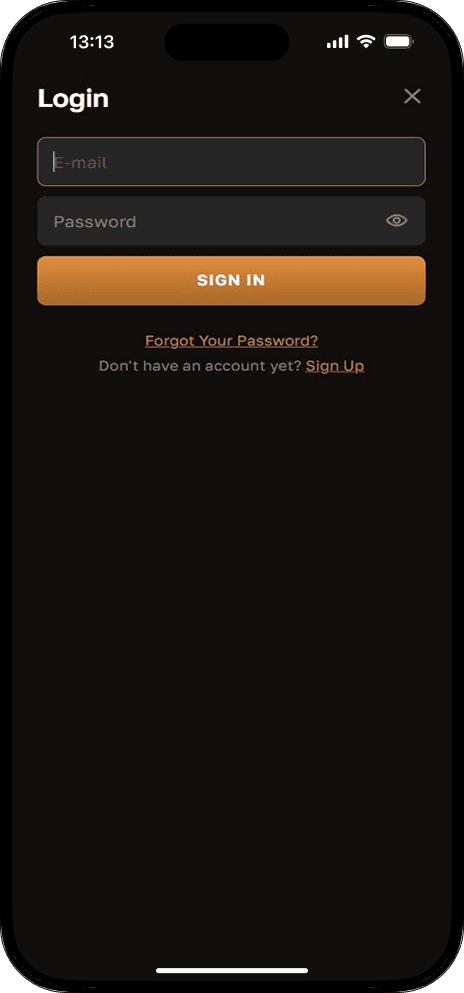
- Open your mobile browser. Go to our website.
- Tap the login icon. It is up top.
- Enter your account details. Use your virtual keyboard.
- Submit the provided data. Access your personal dashboard.
Mobile authentication supports biometric features if enabled on your personal device. Using fingerprint or face recognition significantly speeds up your daily CrownGold login. We strongly recommend updating your mobile operating system to the latest version. Older software might block essential security scripts needed for secure connections. Avoid using public wireless networks when transmitting your password. Unsecured connections expose your private data to potential interception risks. Your mobile session shares the same security protocols as the desktop version. We guarantee identical functionality across all portable devices after a successful CrownGold log in. You can manage your entire bankroll directly from your cellular phone.
CrownGold Registration Verification And Security
We enforce strict identity checks for all active players. You must verify your profile after your CrownGold registration completes.
- Provide your government passport. Ensure the photo shows.
- Upload your driving license. Check the expiration date.
- Submit a utility bill. It proves your address.
- Send recent bank statements. They verify your residence.
All uploaded images must display the document corners clearly. We reject blurred photos or files containing heavy digital alterations. Do not use flash photography when capturing your identification cards. The name on your documents must match your CrownGold sign up data exactly. Our system utilizes 256 bit SSL encryption to protect your uploaded files. We store your sensitive data on isolated servers offline. Aveazure SRL never shares your personal information with unauthorized third parties. Completing this process early prevents frustrating delays during your first payout. You only need to verify your identity 1 time. We might request additional documents if your transaction volume increases. Strict adherence to these rules ensures uninterrupted access following your CrownGold casino login.

Forgot your password?
RESET IT IN ABOUT A MINUTE
By email or SMS
Exclusive CrownGold Sign Up Bonus
We offer competitive promotional packages for new Australian players. Completing your CrownGold sign up unlocks unique deposit multipliers. You must deposit at least 30 AUD to trigger the reward. The system credits bonus funds automatically after successful deposits. You must complete a 40 times rollover requirement within 14 days before withdrawing. Failing to meet these conditions voids the bonus balance. You cannot combine this offer with other promotions after your CrownGold casino login. Slots contribute 100% toward wagering completion. Review specific game contributions on our terms page.
Features After CrownGold Registration
Activating your profile instantly unlocks multiple platform sections. You gain immediate catalog access right after your CrownGold registration. You can explore various CrownGold casino pokies without real financial risk using virtual credits. Registered members can contact live support agents 24 hours daily. You can update personal details during your CrownGold login. The cashier section becomes visible for reviewing payment methods. You cannot place real money bets or access live tables until you fund your wallet. Making a 20 AUD deposit transforms your profile into an active status. This upgrades your account to access premium VIP functions following a CrownGold casino australia login.

Coming back to your account
SIGN IN TO YOUR ACCOUNT
Email, phone or social sign-in
CrownGold Login Payment Methods
We process all financial transactions utilizing highly secure payment gateways. Our platform supports various local methods for your CrownGold login sessions. You can manage your funds using traditional cards or modern digital solutions. Visit the official payments section to review detailed transaction rules. We process all incoming deposits instantly without deducting any internal commission fees. Withdrawal speeds depend entirely on your selected payment provider after a successful CrownGold casino australia login. We authorize payouts within 48 hours after verifying your identity. You must withdraw funds using the same method utilized for your deposit.
| Payment Method | Minimum Deposit | Minimum Payout | Speed |
| Visa | 20 AUD | 50 AUD | 1 day |
| Mastercard | 20 AUD | 50 AUD | 1 day |
| Bank Transfer | 50 AUD | 100 AUD | 3 days |
| Neosurf | 20 AUD | 50 AUD | 1 day |
We require you to complete the identity verification protocol before requesting 1 payout. Strict compliance ensures your money reaches your account safely. Review your bank statements regularly to track your spending effectively.
Desktop CrownGold Log In Deposits
Managing your bankroll from a computer is completely straightforward. Our desktop cashier interface provides clear visibility following your CrownGold log in.
The funds will appear in your balance within 1 minute. When requesting a payout, you must select the withdrawal menu instead. Your available balance must exceed 50 AUD to initiate a payout. We process withdrawal requests only during standard business hours. You cannot cancel a payout once our finance team approves it. Ensure you have completed all active bonus wagering requirements first. Attempting to withdraw early will forfeit your entire bonus balance. We send an automated email receipt for every successful transaction linked to your CrownGold casino login. Retain these digital receipts for your personal financial records.
Mobile CrownGold Casino Login Payouts
Our mobile cashier adapts perfectly to your touch screen device. You can fund your account efficiently during any CrownGold casino login.
- Enjoy fast screen navigation. Tap buttons with ease.
- Use mobile wallet apps. Authorize payments very quickly.
- Scan your payment cards. Save time entering numbers.
- Receive instant push alerts. Track your money easily.
Mobile transactions often benefit from integrated biometric authorization tools. You can confirm deposits using your fingerprint or facial recognition software. This eliminates the need to memorize complex banking passwords daily. Do not switch your network connection while processing a payment after your CrownGold log in. Losing signal during a transaction might cause temporary processing errors. If a deposit fails, check your bank balance before trying again. We encrypt every mobile payment using the latest security protocols. Your financial data never stays stored directly on your cellular phone. We recommend using private networks for all monetary operations.
Fixing CrownGold Casino Login Issues
Players occasionally encounter technical barriers when attempting to access their accounts. You can resolve most authentication problems following your CrownGold casino login attempt.
- Request password recovery links. Check your email inbox.
- Submit required identity documents. Unlock restricted account profiles.
- Clear stored browser cache. Fix unusual graphical glitches.
- Disable active proxy servers. Ensure stable local connections.
Our system will immediately dispatch a reset token to your email if requested. Check your spam folders if the message does not arrive within 5 minutes. We automatically suspend profiles if we detect unauthorized connection attempts during your CrownGold log in. Accessing your account via proxy services violates our terms and triggers an automatic block. You must contact our customer support team to lift these geographical restrictions. Creating duplicate accounts constitutes a severe violation of our platform rules. If you register a second profile, our security algorithms will lock both accounts. You must explain the situation to our compliance officers to resolve this conflict. We remain available 24 hours daily to assist with access problems.
Delete CrownGold Sign Up Account
We provide straightforward options for terminating your membership. You cannot delete your profile automatically after your CrownGold sign up. We require a formal request sent directly to customer support using your registered email. Include your full name and closure reason. Our agents process termination requests within 48 hours. You must withdraw your remaining balance entirely through a secure CrownGold login before requesting closure. We cannot delete accounts holding active funds. Once deleted, you permanently lose profile history and VIP status. We retain basic personal data for 5 years to comply with anti money laundering laws.
CrownGold Registration Responsible Gambling
We actively promote safe entertainment and provide vital player tools. You maintain control over spending habits following your CrownGold registration. We offer customizable daily, weekly, and monthly deposit limits. Lowering limits takes effect instantly, while increasing requires a 24 hour cooling period. You can activate voluntary timeouts ranging from 1 day to 6 months. During timeouts, you cannot make deposits via a CrownGold casino login. We also offer permanent self exclusion options.
FAQ About CrownGold Casino Login
You cannot alter your base currency once you finalize the profile setup. The system permanently links your selected currency to your unique account ID after your CrownGold sign up. If you made a mistake, contact our support team before making your 1 deposit.
Our security systems actively monitor all incoming network connections. Using a proxy masks your true location and violates our geographical compliance rules during your CrownGold casino australia login. The system will automatically suspend your account if it detects restricted software. You must log in using your standard internet connection.
We classify profiles as inactive after 6 months of zero activity following your last CrownGold login. We apply a monthly administrative fee of 5 AUD to dormant accounts containing funds. If your balance reaches 0 AUD, we will not charge further fees. You can reactivate your dormant profile anytime by simply logging in again.